
If you would like to learn more about our RevOps Dashboards, check out our collection of articles: RevOps Dashboards
Who Can Access Dashboards and AI Insights
LeanLaw's new Dashboard tab and AI Insights feature give your firm a real-time view into revenue performance — WIP, billing, collections, realization rates, and more. Here's how access works and how to adjust it.
Default Access by Plan
Core On the Core tier, all roles except timekeepers have access to the Dashboard tab and AI Insights by default. Timekeepers can log time and manage their own entries, but they won't see firm-level revenue reporting.
If you want to adjust which roles can see this data, you'll need to upgrade to Pro or Elite.
Pro and Elite On Pro and Elite, access to Dashboards and AI Insights follows whatever role permissions you've already set up for revenue reports. If a role had access to revenue reports before this release, they were automatically given access to the new Dashboard tab and AI Insights.
You can customize access at any time.
Note: Currently, access to the reports on the Dashboard tab is not customizable per report. For instance, you can’t allow timekeepers to see the WIP report, but not the financial performance report.
How to Update Access (Pro and Elite)
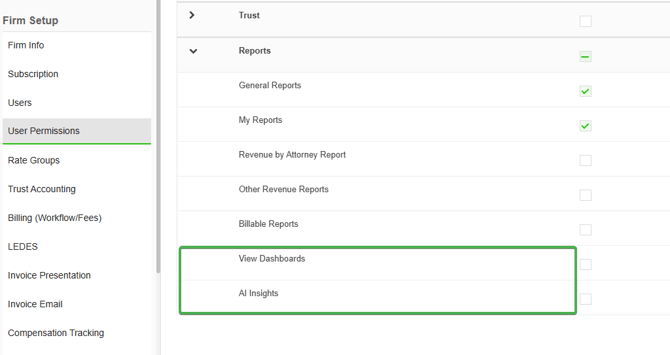
- Go to Settings → User Permissions → Reports
- Find the role you want to update
- Toggle access to Revenue Reports, Dashboard, and AI Insights on or off as needed
Changes take effect immediately. Users will see the Dashboard tab appear or disappear from their navigation on their next page load.
What's in the Dashboard and AI Insights?
The Dashboard surfaces firm revenue data across the full billing cycle — from time entries and WIP through invoicing and collections. AI Insights lets users ask questions about that data in plain language.
Because this data includes sensitive financial information — billed amounts, collected revenue, realization rates, and write-offs by attorney and matter — we recommend being intentional about which roles have access, particularly in firms where attorneys don't have visibility into each other's billing performance.
Questions? Reach out to our Solution Engineering team and we're happy to help you think through the right permission setup for your firm.