
Lien Identification
The Settlement Wizard pulls liens from the Liens tab on the matter — liens you’ve recorded with structured data (payee, type, amount, status). Only liens with a Finalized or Paid status are included on the statement.
On the Settlement Statement
Liens appear in the “Third-Party Liens / Payments” subsection under Expenses:
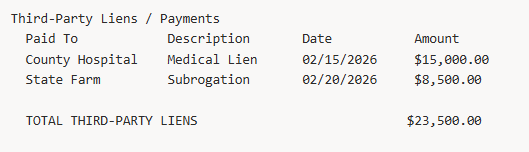
This total is deducted from the client’s net proceeds along with the attorney fee and case expenses.
Important Notes
- Liens are displayed separately from case expenses — they are never combined or conflated
- Only liens with a Finalized or Paid status appear on the statement
- If no liens exist, the “Third-Party Liens / Payments” section is omitted from the PDF